
Loftia Cheats: ESP, Teleport, Auto Farming & Perfect Minigames
Loftia cheats are for players who like the game but not the hours of busywork that come with it. Most of your time in Loftia goes into the same loop: walk to a node, hit it, carry the materials back, water the crops, cast a line, cook, craft and repeat. Our Loftia cheat handles that loop for you. It shows every resource, crate and fishing spot on your screen, teleports you to the nearest one, collects and farms on its own and plays the fishing, cooking and crafting minigames perfectly. A 30 day key costs $14.99.
Game: Supports Loftia on Steam, Xbox App & Epic Games
Requirements: Windows 10/11 (incl. 26H2) · Intel & AMD · Fullscreen, Borderless or Windowed
Hack Status: Check our live status page before you buy

Loftia Hacks by Play With Cheats
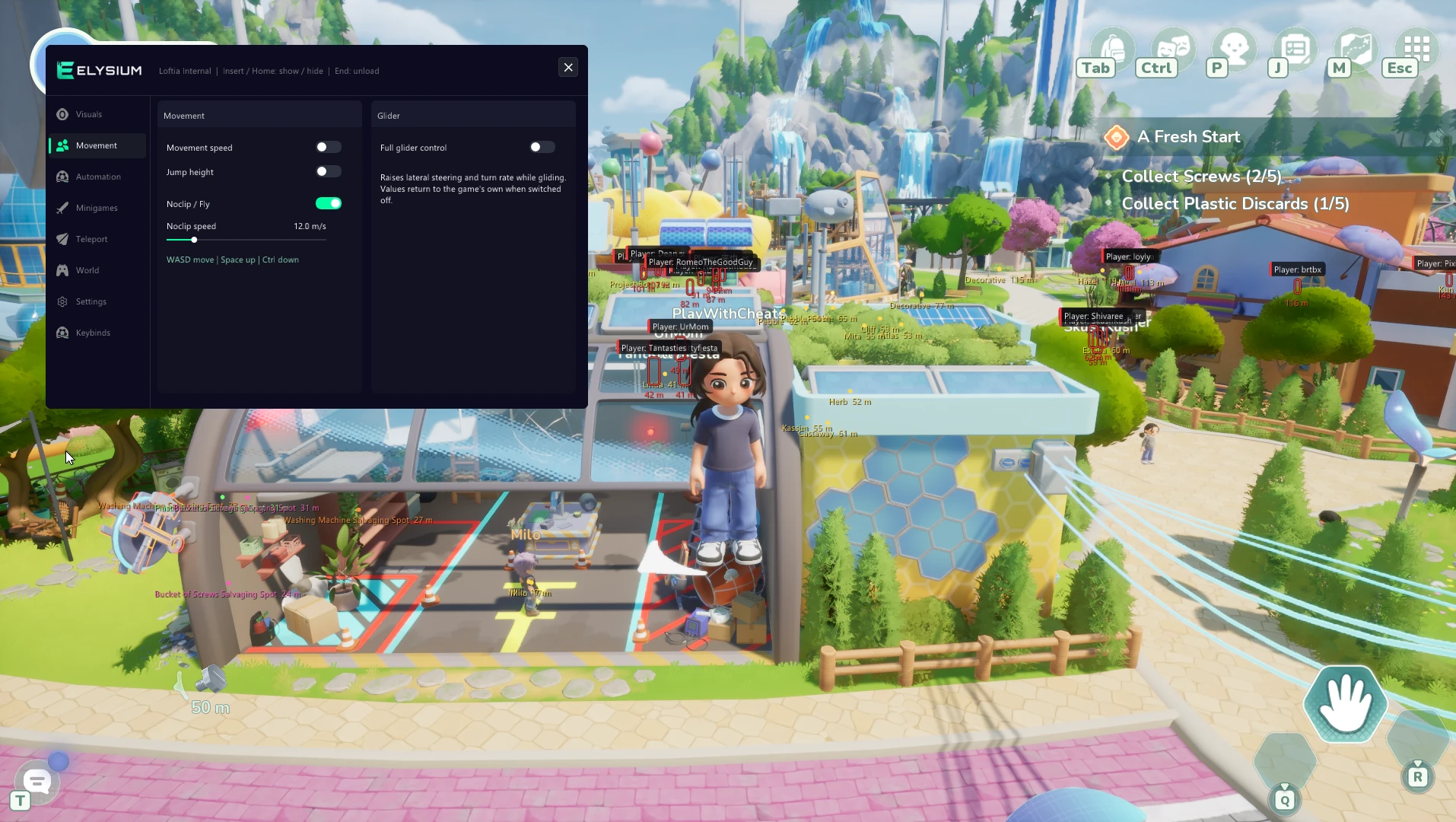
Elysium Lof is our menu for Loftia. It has six tabs: Visuals / ESP, Movement, Automation, Minigames, Teleport and World, and you open it in game with the Insert key. Every option is a simple switch or slider, and you can set your own keybinds for the ones you use most.
The Loftia cheat works on every Windows 10 and 11 version, including 26H2, on Intel and AMD processors. It supports the Steam, Xbox App and Epic Games versions of the game, in fullscreen, borderless or windowed mode. A 30 day key is $14.99 and a Lifetime key is $49.99. Both unlock the full menu, so there are no feature tiers to pick between.
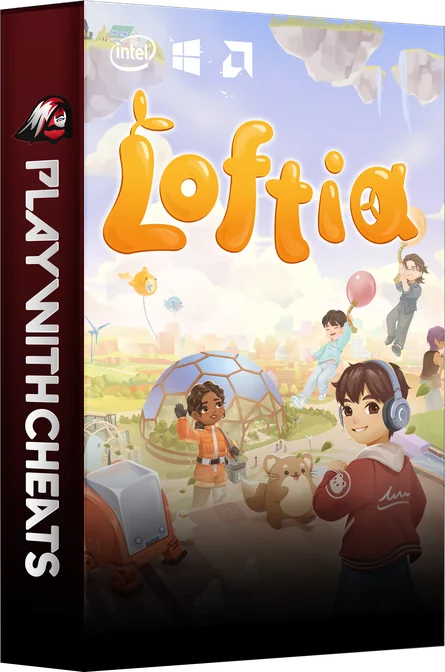
Advanced Cheats For Loftia
Some players want the whole map marked so they can plan a route. Others want to leave the farm running while the cheat waters and harvests. The menu covers both, and every feature can be turned on or off at any time without restarting the game.
What the Menu Does
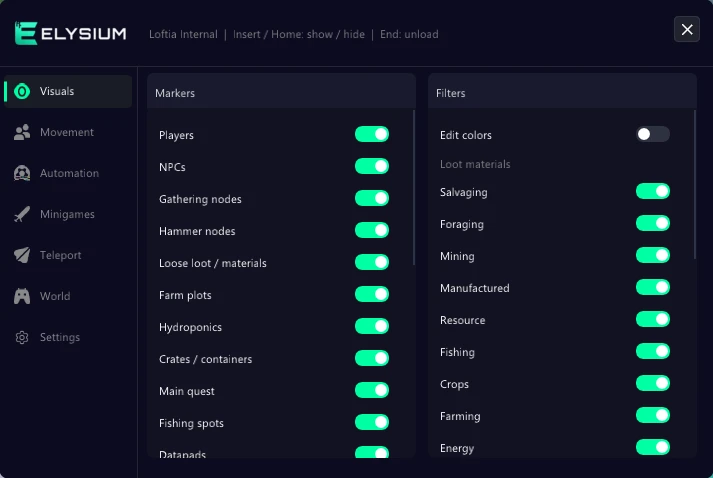
ESP & Visuals: Players and NPCs get a box, name and distance. Gathering and hammer nodes, loose materials, crates, farm plots, hydroponics, fishing spots, datapads and the main quest marker can each be shown on their own, with loot filters and custom colors.
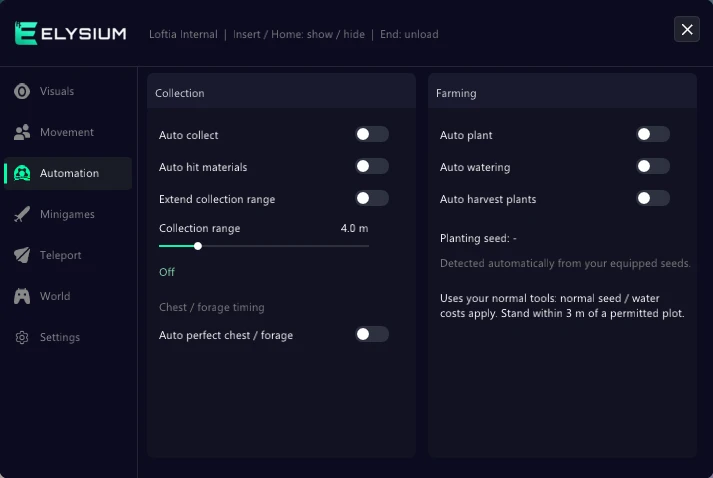
Automation & Minigames: Auto collect, auto hit materials and a longer collection range take care of gathering. Auto plant, auto watering and auto harvest run the farm. Fishing, cooking and crafting are completed perfectly, and auto repair fixes your gear.
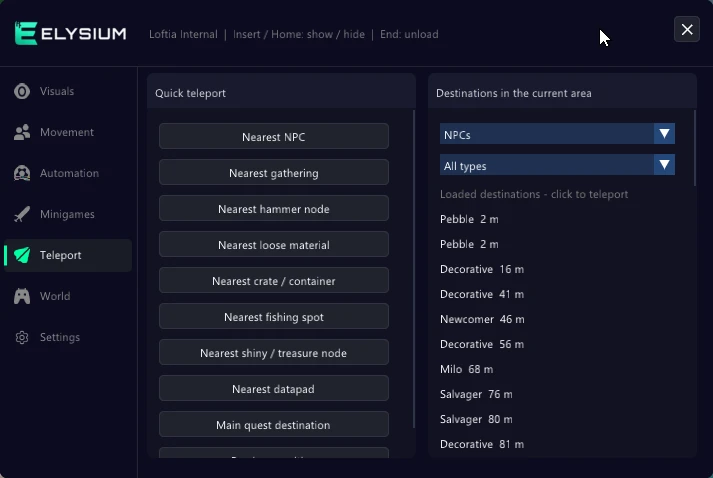
Teleport & Movement: Jump straight to the nearest node, crate, fishing spot, datapad, NPC or quest destination, or pick a place from the click-to-teleport list. Movement speed, jump height, noclip and full glider control cover the rest of your travel.
Setup & Support
Easy to Use: After payment you get the download, your personal key and a step-by-step tutorial in your My Account section.
Clean Files: The loader contains no miners, adware or keyloggers. It only runs the menu.
Kept Updated: When Loftia updates, the cheat is rebuilt and the current state is shown on our status page. Check it before you start a session.
✩ Here you will find all features implemented in our Loftia cheat ✩
| Visuals / ESP & Movement | Automation & Minigames | Teleport & World |
|---|---|---|
 Player ESP (Box, Name, Distance) |
Auto Collect |
Teleport To Nearest NPC |
| NPC ESP |
Auto Hit Materials |
Nearest Gathering / Hammer Node |
| Gathering & Hammer Nodes |
Extended Collection Range |
Nearest Loose Material |
| Loose Loot / Materials |
Auto Perfect Chest / Forage |
Nearest Crate / Container |
| Farm Plots & Hydroponics |
Auto Plant |
Nearest Fishing Spot |
| Crates / Containers |
Auto Watering |
Nearest Shiny / Treasure Node |
| Main Quest Marker |
Auto Harvest Plants |
Nearest Datapad |
| Fishing Spots & Datapads |
Auto Perfect Fishing |
Main Quest Destination |
| Loot Filters (Salvage, Forage, Mining, Crops) |
Auto Fishing (Nearest Spot) |
Click-To-Teleport List |
| Custom ESP Colors |
Auto Perfect Cooking |
FOV & Camera Distance Override |
| Movement Speed |
Auto Perfect Crafting |
First-Person Camera |
| Jump Height |
Auto Repair |
Free Camera (Photo Mode) |
| Noclip / Fly |
Auto-Walk |
|
| Adjustable Noclip Speed |
Hide Player Names |
|
| Full Glider Control |
Auto Dialogue |
|
| Lock Time Of Day |
||
| Weather Override |
||
| Custom Keybinds |
The Loftia ESP
Finding things is a big part of Loftia, and the ESP shows them before you get there. You decide what is drawn, so the screen only shows what you are actually farming today.
- Players & NPCs: Player ESP with box, name and distance, plus a separate NPC ESP, so you can find the character you need for a quest.
- Resources: Gathering and hammer nodes, loose loot and materials, and crates and containers are each a separate switch.
- Farm, Fishing & Datapads: Farm plots and hydroponics, fishing spots, datapads and the main quest marker are all shown on screen.
- Loot Filters & Colors: Filter by salvage, forage, mining, crops and more, and give each category its own ESP color.
All of these settings are on the Visuals / ESP tab, and each one can be toggled while you play.
Auto Farming and Perfect Minigames With Loftia Hacks
The Automation and Minigames tabs are where these Loftia hacks save the most time. They take over the repetitive jobs, so you can spend your play time on the parts of the game you actually enjoy.
- Gathering: Auto collect picks things up for you, auto hit materials works the nodes, and the extended collection range reaches items further away.
- Farming: Auto plant, auto watering and auto harvest plants keep your crops going without you walking every row.
- Perfect Results: Auto perfect chest and forage, auto perfect fishing, auto perfect cooking and auto perfect crafting land the best outcome every time.
- Fishing & Repair: Auto fishing casts at the nearest spot by itself, and auto repair keeps your tools working.
Teleport, Movement and World Options in the Loftia Cheat
Travel takes up a lot of time in Loftia. The Teleport tab moves you to what you need, and the Movement and World tabs change how you get around and how the game looks.
- Teleport To Nearest: NPC, gathering or hammer node, loose material, crate, fishing spot, shiny or treasure node, datapad or the main quest destination.
- Click-To-Teleport List: Choose any destination from the list and you are there.
- Movement: Movement speed, jump height, noclip and fly with adjustable noclip speed, and full glider control.
- Camera & World: FOV and camera distance override, first-person camera, free camera for photos, lock time of day and weather override.
- Quality of Life: Auto-walk, auto dialogue, hide player names and custom keybinds.
Play Loftia Your Way With Loftia Hacks
Loftia is a relaxing game until the grind starts to feel like a second job. With the ESP showing every resource, teleport taking you to it and the automation doing the farming, an hour of play gets you as far as an evening used to. You can still play as much of the game by hand as you like. The menu only does the parts you switch on.
Use it to finish a quest line faster, to fill your storage before a big crafting session, or just to get perfect fish and meals every time. Loftia hacks start at $14.99 for 30 days, and setup only takes a few minutes with the tutorial included in your account.
Is the Loftia Cheat Safe?
No cheat can promise zero risk, and Loftia is an online game, so how you use it matters. Features that change what you see, like the ESP, loot filters and camera options, are the quietest. Things other players can watch happen, such as noclip through walls or teleporting in front of them, are the ones most likely to get you reported. A sensible approach is to keep movement speed moderate, teleport when nobody is nearby, and hide player names if you stream or record.
Every build is tested in game before it goes up for sale, and when an update breaks something we fix it and show the change on the status page. You also get a full setup guide with your key, so you are never left guessing how to install the loader.
If you want ESP, teleport, auto farming and perfect minigames for Loftia in one menu, Elysium Lof has all of it for one price. Grab a key and your download is waiting in your account right after payment.